> ## Documentation Index
> Fetch the complete documentation index at: https://auth0.com/llms.txt
> Use this file to discover all available pages before exploring further.
# ResetPasswordRequest
> Describes all the hooks and methods available to customize the Universal Login `reset-password-request` screen.
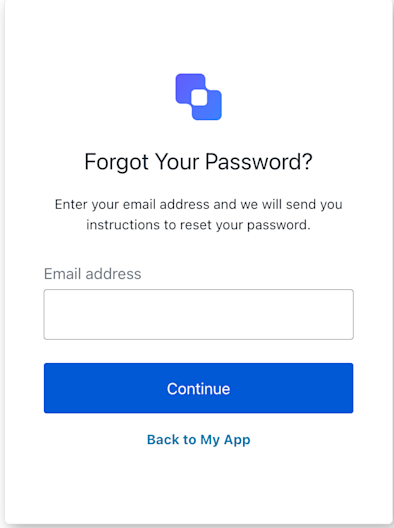
The `reset-password-request` screen is displayed at the start of the password reset flow. It prompts the user to enter their username or email address to receive a password reset link.
## Import
Each screen has its own set of hooks and methods. The SDK supports **partial import** and **root import** for each screen.
* Using partial import allows you to include only the code you need for your specific use case.
* Using root import allows you to load all screens from a single bundle, which is useful when you want a unified build to handle all possible screens.
```jsx Import Example theme={null}
// root import
import { useResetPasswordRequest } from '@auth0/auth0-acul-react';
// partial import
import {
useResetPasswordRequest,
// Context hooks
useUser,
useTenant,
useBranding,
useClient,
useOrganization,
usePrompt,
useScreen,
useTransaction,
useUntrustedData,
useExperiment,
// Common hooks
useCurrentScreen,
useAuth0Themes,
useErrors,
useLoginIdentifiers,
// Utility hooks
useChangeLanguage,
// Methods
backToLogin,
resetPassword,
} from '@auth0/auth0-acul-react/reset-password-request';
function ResetPasswordRequestScreen() {
const { resetPassword } = useResetPasswordRequest();
return (
);
}
```
## Context Hooks
Screen-scoped hooks that provide read-only access to Auth0 context data on the `reset-password-request` screen. Import them from `@auth0/auth0-acul-react/reset-password-request`.
**useBranding**
This hook provides branding configurations, such as logo, colors, and theme settings displayed on the `reset-password-request` screen.
```jsx Example theme={null}
import { useBranding } from '@auth0/auth0-acul-react/reset-password-request';
function CustomTheme() {
const branding = useBranding();
}
```
**useClient**
This hook provides client-related configurations, such as `id`, `name`, and `logoUrl`, for the `reset-password-request` screen.
```jsx Example theme={null}
import { useClient } from '@auth0/auth0-acul-react/reset-password-request';
function AppInfo() {
const client = useClient();
}
```
**useExperiment**
This hook provides the active [Experiment Center](/docs/customize/experiment-center) experiment for the `reset-password-request` screen, or `null` when no experiment is active (or the screen has not opted in via `context_configuration`).
```jsx Example theme={null}
import { useExperiment } from '@auth0/auth0-acul-react/reset-password-request';
function ExperimentBranch() {
const experiment = useExperiment();
if (!experiment) return null;
return experiment.isControl ? : ;
}
```
**useOrganization**
This hook provides information about the user's Organization if the password reset is Organization-scoped. Returns `null` when no Organization context is present.
```jsx Example theme={null}
import { useOrganization } from '@auth0/auth0-acul-react/reset-password-request';
function OrgSelector() {
const organization = useOrganization();
if (!organization) {
return
No Organization context
;
}
}
```
**usePrompt**
This hook contains data about the current prompt in the authentication flow.
```jsx Example theme={null}
import { usePrompt } from '@auth0/auth0-acul-react/reset-password-request';
function FlowInfo() {
const prompt = usePrompt();
}
```
**useScreen**
This hook contains details specific to the `reset-password-request` screen, including its configuration and context.
```jsx Example theme={null}
import { useScreen } from '@auth0/auth0-acul-react/reset-password-request';
function ScreenDebug() {
const screen = useScreen();
}
```
**useTenant**
This hook contains data related to the tenant, such as `id` and associated metadata.
```jsx Example theme={null}
import { useTenant } from '@auth0/auth0-acul-react/reset-password-request';
function TenantInfo() {
const tenant = useTenant();
}
```
**useTransaction**
This hook provides transaction-specific data for the `reset-password-request` screen, such as active connections and current flow state.
```jsx Example theme={null}
import { useTransaction } from '@auth0/auth0-acul-react/reset-password-request';
function TransactionInfo() {
const transaction = useTransaction();
}
```
**useUntrustedData**
This hook handles untrusted data passed to the screen, such as a prefilled email or username from URL parameters.
```jsx Example theme={null}
import { useUntrustedData } from '@auth0/auth0-acul-react/reset-password-request';
function PrefilledForm() {
const untrustedData = useUntrustedData();
}
```
**useUser**
This hook provides details of the active user, including `username`, `email`, and available authentication methods.
```jsx Example theme={null}
import { useUser } from '@auth0/auth0-acul-react/reset-password-request';
function UserProfile() {
const user = useUser();
}
```
**useResetPasswordRequest**
This hook returns all methods and context available on the `reset-password-request` screen.
## Methods
**backToLogin** `Promise\`
This method navigates the user back to the login screen, cancelling the password reset flow.
```jsx Example theme={null}
import { useResetPasswordRequest } from '@auth0/auth0-acul-react/reset-password-request';
function BackToLoginButton() {
const { backToLogin } = useResetPasswordRequest();
return (
);
}
```
**resetPassword** `Promise\`
This method submits the username or email to initiate the password reset process.
```jsx Example theme={null}
import { useResetPasswordRequest } from '@auth0/auth0-acul-react/reset-password-request';
function ResetPasswordForm() {
const { resetPassword } = useResetPasswordRequest();
return (
);
}
```
**Method Parameters**
**Parameters**
**options**
[ResetPasswordRequestOptions](/docs/libraries/acul/react-sdk/API-Reference/Types/interfaces/ResetPasswordRequestOptions).
**username** `string` *required*
The username or email address of the account to reset.
**captcha?** `string`
The CAPTCHA response token, required when CAPTCHA is enabled for the tenant.
## Common/Utility Hooks
This hook returns the login identifier types (email, username, phone) configured for the current connection.
This hook gets the current theme options with flattened configuration from branding context.
This hook returns a function for changing the display language on the current ACUL screen.
This hook gets the current screen context and state.
This hook reads and manages server, client, and developer errors on the screen.